Semantic HTML is one of the highest return skills in frontend development. It improves accessibility, supports search visibility, and makes your CSS and JavaScript easier to manage. If your markup has clear meaning, everything built on top of it gets more stable.
If you are new to the topic, start with HTML in 2026: Still Relevant in the Age of AI for context on why HTML structure still drives modern web quality.
What "semantic" actually means
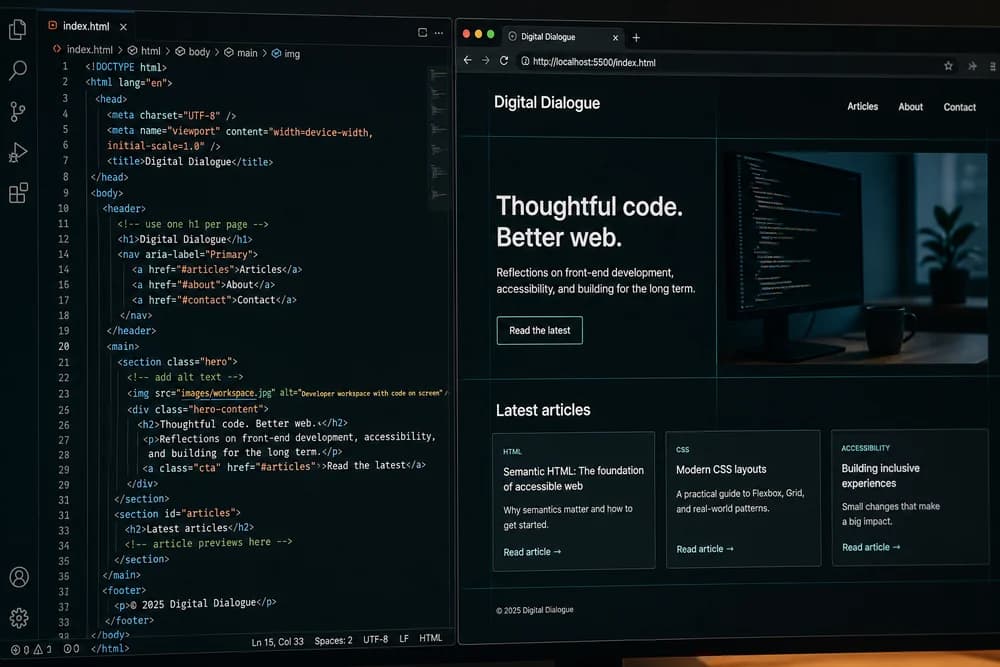
Semantic HTML means choosing elements based on purpose, not default appearance. For example:
Use
buttonfor actionsUse
navfor primary navigationUse
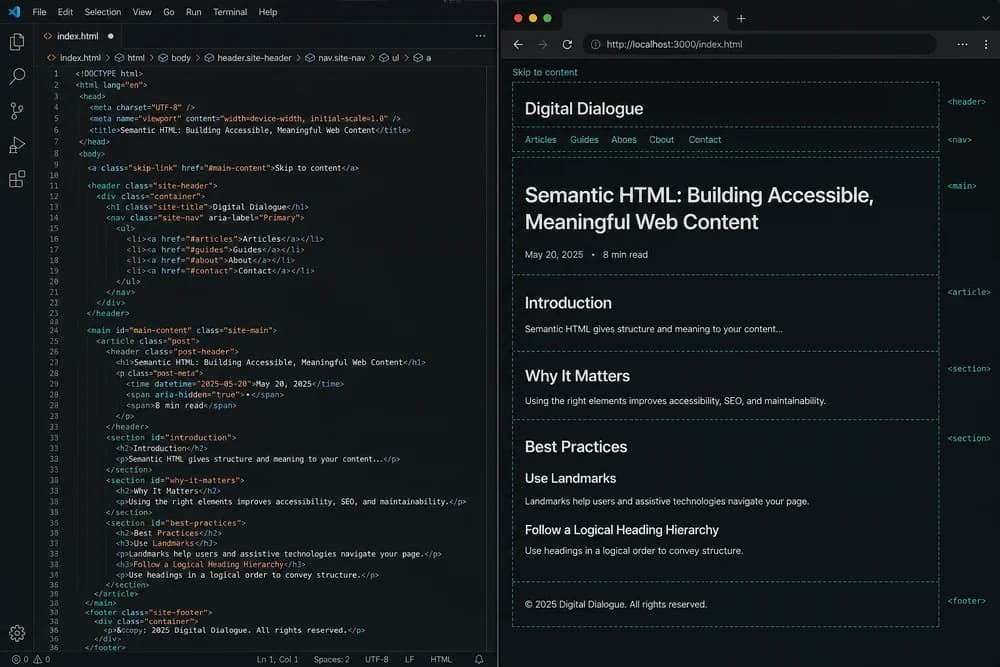
mainfor the page's main contentUse
articlefor standalone content units
This matters because browsers, assistive technologies, and search engines all infer meaning from these choices.
Core checklist: page structure
Use this first pass on every page before styling.
1) One clear main region
Each page should have one main content area. Keep repeated elements like header, nav, and footer outside it.
2) Proper landmark elements
Use landmarks where relevant:
headernavmainasidefootersectionwith meaningful headings
Landmarks help screen reader users jump through page regions quickly.
3) Heading hierarchy makes sense
Headings should form a logical outline:
Start from one page-level heading in your template
Use deeper levels in order where possible
Do not skip levels just for visual size
If heading order looks random, users and crawlers both lose context.
4) Lists are real lists
If content is a list, use ul, ol, and li. Do not fake list layouts with plain div tags.
5) Forms use labels and grouped inputs
Every input needs an associated label. Use fieldset and legend where fields belong together. Placeholder text is not a label replacement.
Core checklist: links, buttons, and media
Interactive elements are where semantic mistakes hurt most.
1) Links go somewhere, buttons do something
Use
afor navigationUse
buttonfor actions
A clickable div with JavaScript usually creates keyboard and accessibility issues.
2) Link text is descriptive
Avoid repeated "click here" links. Use text that makes sense out of context, such as "View pricing plans" or "Read setup guide."
3) Images have meaningful alt text when needed
Use alt text that reflects purpose:
Informative images: short descriptive alt text
Decorative images: empty alt (
alt="")
Do not stuff keywords into alt text. Keep it useful for users who cannot see the image.
4) Video and audio have basic accessibility support
When relevant, provide captions or transcripts and avoid autoplay audio surprises.
SEO-focused semantic checks
Semantic HTML does not replace broader SEO work, but it provides strong technical foundations.
Title and meta description alignment
Make sure page metadata and content intent match. Do not title pages one way and present unrelated content in body sections.
Clear content sections
Use meaningful section headings that reflect real subtopics users search for. This helps both scanning and topical clarity.
Internal links that guide users
Connect related resources naturally in context, such as pairing semantic structure with styling and scripting workflows:
This helps readers go deeper without guessing what to read next.
Accessibility-focused semantic checks
Strong semantics improve accessibility before you add ARIA attributes.
Keyboard interaction works without hacks
Users should be able to tab through actionable elements in a sensible order. If something is clickable, it should be focusable and operable by keyboard.
Use native elements before ARIA
Native HTML usually provides expected behavior by default. Start there first. Add ARIA only when native semantics are not enough for a custom component.
Error handling in forms is clear
When validation fails:
Explain the issue in plain language
Point to the field that needs correction
Keep focus behavior predictable
Accessibility is not only about structure, it is also about recoverable user flows.
Common semantic mistakes and quick fixes
Mistake: Everything is a div
Fix: Replace generic wrappers with meaningful elements where purpose is clear. Keep div for grouping with no semantic meaning.
Mistake: Headings are used only for visual size
Fix: Use CSS for appearance and keep heading levels for structure.
Mistake: Click handlers on non-interactive elements
Fix: Replace with button or link, then style as needed.
Mistake: Missing labels in forms
Fix: Add explicit labels linked by for and id.
Mistake: Repeated generic link text
Fix: Make each link destination clear in the anchor text.
For more beginner pitfalls with practical fixes, see Common HTML Mistakes Beginners Make (and How to Fix Them).
A practical semantic audit workflow
Use this lightweight process on any page:
Step 1: Read the HTML without CSS
Temporarily ignore styles. Ask:
Can I understand page structure?
Are sections clearly named?
Do actions and navigation look semantically correct?
Step 2: Test keyboard flow
Tab through the page and check whether focus reaches everything users need.
Step 3: Review headings and landmarks
Ensure heading levels and landmarks reflect actual information hierarchy.
Step 4: Validate forms and feedback
Submit with empty fields and invalid values. Check label clarity, error messaging, and recovery flow.
Step 5: Review internal link usefulness
Confirm related links help users complete next steps, not just increase link count.
Semantic HTML in team workflows
Semantic quality improves fastest when it becomes part of team habits, not a one-time cleanup task.
Add semantic checks to code review
During pull request review, ask simple questions:
Does this section use the right landmark or container?
Are headings structured for meaning, not only design?
Are interactions mapped to correct elements like links and buttons?
Can forms be understood without placeholder text?
These questions are quick to apply and prevent recurring regressions.
Use component templates with good defaults
If your project has reusable components, include semantic defaults in templates:
Card components with meaningful heading structure
Form components with built-in labels and helper text slots
Navigation components that preserve landmark semantics
When defaults are solid, beginners and experienced developers both ship cleaner markup.
Keep accessibility checks lightweight but consistent
You do not need a huge audit for every small page update. A short repeatable pass works better:
Keyboard tab flow
Heading and landmark review
Form and error-message clarity
Consistency beats occasional deep audits that only happen during release crunch.
How this checklist supports real projects
Semantic HTML is not a school exercise. It helps production teams:
Ship clearer templates
Reduce accessibility regressions
Keep CSS and JS targeting cleaner
Improve maintainability during redesigns
If you are building practical pages to apply this checklist, start with How to Build a Landing Page with Only HTML and CSS. It is a great format for practicing structure, headings, forms, and content flow in one place.
Final takeaway
You do not need perfect markup from day one. You need repeatable checks that catch the biggest structure mistakes early. Run this checklist on every page, improve one layer at a time, and your frontend work will become easier to style, script, and scale.